

What Is DNS Propagation and How Long Does It Take?
August 2026 · DNS Progress Team
You changed a DNS record, waited, refreshed the page… and your website still shows the old version. Meanwhile a colleague on a different network already sees the new site. Confusing? Yes. Normal? Also yes. That delay is called DNS propagation, and it trips up almost everyone who launches a website, moves hosting, or switches email providers.
This guide explains what DNS propagation is, why it happens, how long it really takes, and how to check — and speed up — propagation when you are deploying a website or app.
What is DNS propagation?
DNS propagation is the time it takes for a change to your DNS records to spread across the internet — from your DNS provider to every DNS server, ISP cache, and network around the world.
To understand it, remember what DNS actually does. The Domain Name System is
the internet’s address book. When someone types example.com, their device
does not know the server’s IP address, so it asks a chain of DNS servers. The
diagram below shows the typical lookup flow.
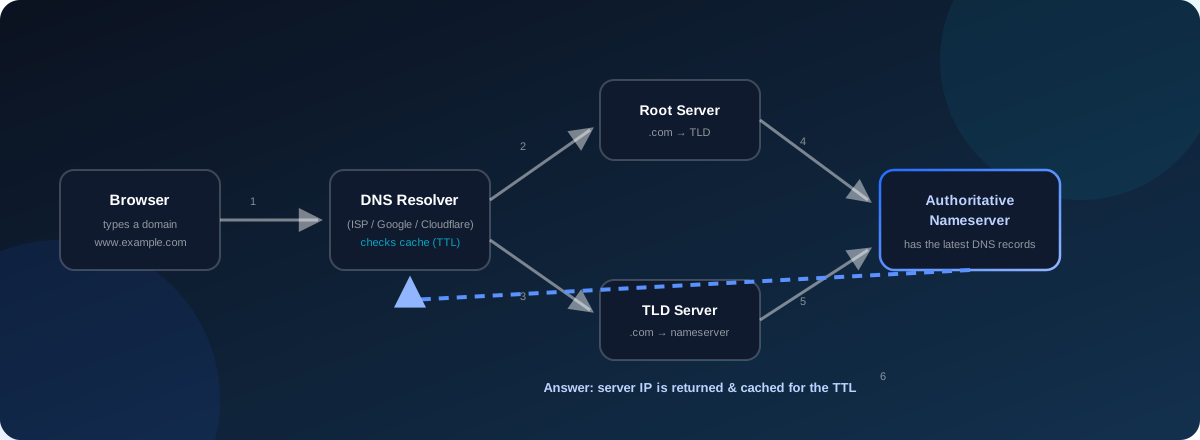
- The browser asks the local DNS resolver (usually run by the ISP, or Google, Cloudflare, etc.).
- If the resolver has no cached answer, it asks a root server.
- The root server points to the TLD server (for example, the
.comregistry). - The TLD server points to your domain’s authoritative nameserver — the DNS provider that hosts your records.
- The authoritative nameserver returns the answer: the IP address behind your domain.
- The resolver stores that answer in its cache and hands it back to the browser, which then loads the site.
So a “propagation” happens whenever step 6 changes — when the value stored in all those caches around the world is outdated, and each cache needs to notice the change and fetch the new value.
Why does DNS propagation happen?
The short answer: caching. DNS answers are cached at many layers — inside browsers, operating systems, routers, ISP resolvers, and public resolvers like Google Public DNS. Caching is what makes DNS fast: without it, every page view would trigger a full lookup chain.
Every DNS record carries a TTL (Time To Live) — the number of seconds a resolver may keep the answer in its cache before asking again. A TTL of 3600 means “this answer is valid for one hour.” The problem is that when you change a record, every resolver that already cached the old value will keep serving it until that TTL expires. Only after the old cache expires does the resolver re-check your authoritative nameserver and pick up the new value.
In other words, DNS propagation is not a single switch being flipped — it is thousands of independent caches expiring at slightly different times. That is why the change can be visible on one network and not another.
How long does DNS propagation take?
There is no single answer, because it depends on TTL values, which record you changed, and the networks in between. As a practical guide:
| Change | Typical time | Worst case |
|---|---|---|
| A / AAAA record (pointing domain to a new IP) | Minutes to a few hours | 24–48 hours |
| CNAME record | 15 minutes to a few hours | Up to 24 hours |
| Nameserver change (switching DNS provider) | A few hours to 24 hours | 24–72 hours |
| MX record (email routing) | A few hours | Up to 48 hours |
| TXT record (verification, SPF, DKIM) | 5 minutes to a few hours | Up to 48 hours |
A common rule of thumb: most DNS changes propagate within a few hours, and almost everything settles within 72 hours. If your old site still appears after three days, the cause is usually something other than propagation — a stuck cache, a wrong record, or a CDN.
What affects propagation time
Several factors determine whether your change spreads in five minutes or five hours:
- The old TTL. A high TTL (e.g., 86400 = one day) means every resolver keeps the old answer for up to a day. The TTL before the change is what matters for how long propagation takes.
- The record you change. Nameserver changes are slowest because they have to propagate through the domain registry, not just through resolvers. A-record changes are usually faster.
- The resolver. Some resolvers ignore or shorten TTLs; others cache aggressively. Public resolvers like Google (8.8.8.8) and Cloudflare (1.1.1.1) refresh frequently and usually pick up changes quickly.
- Geographic distance and network paths. Updates travel server to server, so remote networks can lag behind.
- Your DNS provider. A fast, reliable DNS provider with servers close to users propagates changes faster than a slow one.
- Local caching. Your own browser, OS, and router may still hold the old answer even after the rest of the internet has updated.
How to check DNS propagation
If you changed a record and want to know whether the world has caught up, you have several options.
Online DNS checkers
Services like dnschecker.org and whatsmydns.net query dozens of DNS servers across multiple countries at once and show you which ones still return the old value. This is the fastest way to see propagation status “around the world” in one screen.
Command-line tools
On your own machine, dig and nslookup let you query specific resolvers
directly:
# Query your own default resolver
dig example.com

# Query a specific resolver (Google Public DNS)
dig @8.8.8.8 example.com

# Query a specific record type
dig example.com MX
If dig @8.8.8.8 returns the new IP but your browser still shows the old
site, the problem is local caching — flush your browser cache or try a
private/incognito window.
Practical tips
- Compare results from several resolvers (
@8.8.8.8,@1.1.1.1,@9.9.9.9) — the answer should be identical. - Remember that DNS propagation ≠ your site being live. Your site loads as soon as the resolver you are using has the new record; propagation is just about everyone else catching up.
- Don’t panic after one hour. Check again at 12 and 24 hours.
How to speed up DNS propagation
You cannot force every ISP to refresh, but you can plan so propagation is fast — or invisible:
- Lower the TTL before you make the change. Set the record’s TTL to 300 (5 minutes) a day or two in advance. When you then change the record, resolvers re-check within minutes instead of hours or days.
- Make changes during low-traffic hours to reduce the impact of any hiccup.
- Use a fast DNS provider with a global anycast network so resolvers worldwide reach your nameservers quickly.
- Update the record once, correctly. Every extra change restarts the propagation clock.
- For moves between servers, keep both servers running during the transition so visitors hitting the old IP still get a working site.
- Flush local caches (browser, OS, router) so you are not the last one seeing the old version.
- If you use a CDN, the CDN itself may cache DNS answers — check its purge/refresh options.
DNS propagation when launching a website or app
This is where DNS propagation stops being a theory and starts affecting real launches. Every time you ship something new, DNS is usually involved:
- New website or web app. You buy a domain, point its A/AAAA or CNAME records at your hosting, and wait for propagation before the site is reachable for everyone.
- Moving hosting. You migrate servers and update the A record. If you leave the TTL high, customers may see an error page or the old site for up to a day.
- Releasing a mobile app with a backend. App users don’t care about DNS — they just tap the icon. A slow or misconfigured API domain means connection errors, bad reviews, and uninstalls on launch day.
- Setting up email. MX, SPF, and DKIM records control whether your business email is delivered or lands in spam. Propagation here can delay email delivery after a provider switch.
- Switching DNS providers entirely. The nameserver change propagates through the registry and is the slowest change of all — worth planning around.
Good launch hygiene — lowering TTLs beforehand, verifying records with a global checker, and keeping the old server up during the switch — is exactly the kind of detail that separates smooth launches from stressful ones. At DNS Progress, we build and launch websites and apps for businesses, and DNS setup is part of every deployment we handle. If you are launching something new, talk to us — we can take care of the infrastructure so you don’t have to learn propagation the hard way.
FAQ
How long does DNS propagation take?
Most DNS record changes propagate within a few hours. A-record changes often take minutes, while nameserver changes can take 24 to 72 hours to reach every corner of the internet. The single biggest factor is the TTL you set before making the change.
Why is my website still showing the old version after 24 hours?
Check whether the change has actually propagated by using an online DNS
checker or dig @8.8.8.8. If resolvers already return the new value but your
browser doesn’t, the problem is local caching — flush your browser cache,
restart your router, or try an incognito window. If resolvers still show the
old value, check that you edited the correct record on the correct
nameserver.
Does DNS propagation affect email?
Yes. MX, SPF, and DKIM records determine where email goes and whether it passes spam checks. After changing these records, email delivery can be delayed or temporarily routed to the old mail server until propagation completes. If you are switching email providers, lower the MX TTL beforehand and run both mail servers during the transition.
What is TTL in DNS?
TTL (Time To Live) is the number of seconds a DNS resolver is allowed to keep an answer in its cache before asking again. Lower TTLs mean changes spread faster but resolvers make more queries; higher TTLs are efficient but make changes slow to propagate.
Can I speed up DNS propagation?
You cannot force every network to refresh instantly, but you can make propagation fast by lowering the TTL before the change, using a fast global DNS provider, and keeping old servers running during the switch. Most importantly, get the record right the first time — every re-edit restarts the clock.
Is DNS propagation the same for all DNS records?
No. Nameserver changes are the slowest (24–72 hours) because they must propagate through the domain registry. A/AAAA and CNAME changes usually take minutes to hours, depending on TTL. MX and TXT records typically propagate within a few hours.
DNS propagation sounds complicated, but once you understand TTLs and caching, it becomes predictable — and preventable. The best way to avoid propagation headaches is to plan them: lower TTLs before a launch, verify with a global checker, and keep the old server alive during the switch.
If you are building or launching a website, app, or digital product, the DNS Progress team handles the full deployment — including DNS — so you can focus on your product. Get in touch and let’s talk about your project.
Related articles
How to Build a Mobile App from Scratch in 2026
A complete step-by-step guide to building a mobile app — from idea to app store launch. Covers planning, design, development, testing, and deployment.
Read article →
PWA vs Native App in 2026: Which One Does Your Business Need?
Should you build a Progressive Web App or a native mobile app? A practical guide comparing cost, performance, features, and use cases to help you decide.
Read article →Need help building your product?
We build mobile apps, websites, and custom software for businesses. Tell us about your project and get honest advice — free.