

PWA vs Native App in 2026: Which One Does Your Business Need?
September 2026 · DNS Progress Team
“Should we build an app or a website?” is one of the most common questions we hear from business owners. In 2026, the line between a website and an app has blurred — Progressive Web Apps (PWAs) can look and feel like native apps, while native apps can load web content. The real question is not whether you need an app, but which type of app best fits your goals, budget, and users.
What is a Progressive Web App?
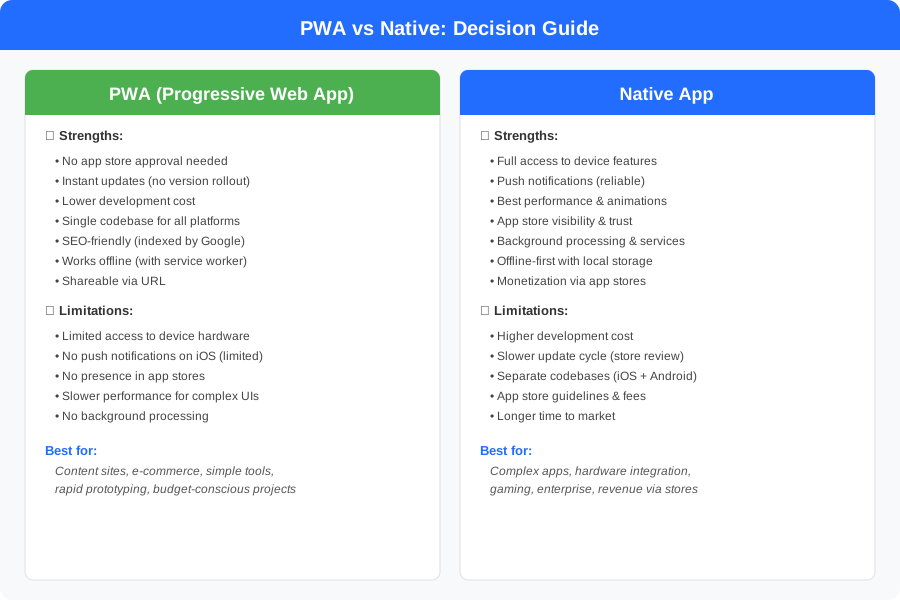
A PWA is a website that uses modern web technologies to deliver an app-like experience. It loads in a browser but can be installed on a user’s home screen, work offline, send push notifications (on Android), and access some device features — all without going through an app store.
PWAs are built with standard web technologies: HTML, CSS, and JavaScript. A service worker runs in the background to cache content and enable offline functioning. A web app manifest tells the browser how to display the app when installed.
The key advantage: you build once, and it works everywhere — iOS, Android, desktop, and the open web. No separate codebases, no app store approval process, no waiting for reviews.
What is a native app?
A native app is built specifically for a platform — iOS or Android — using the platform’s recommended languages and tools. For iOS, that means Swift or Objective-C with Xcode. For Android, Kotlin or Java with Android Studio.
Native apps have full access to everything the device offers: cameras, GPS, Bluetooth, NFC, biometric authentication, sensors, and more. They run directly on the device’s hardware, which means the best possible performance and the smoothest animations.
The trade-off: you typically need separate codebases for iOS and Android (unless you use a cross-platform framework like React Native or Flutter), and every update must go through the app store review process.
Head-to-head comparison
Development cost and time
| Factor | PWA | Native App |
|---|---|---|
| Initial cost | Lower — one codebase | Higher — two platforms |
| Time to launch | Weeks | 2–4 months |
| Ongoing maintenance | One codebase to update | Two codebases + store reviews |
| Required expertise | Web development (JS, CSS) | Platform-specific (Swift, Kotlin) |
A PWA is almost always cheaper and faster to build. If you are a startup testing a new idea, a PWA can get you to market in a fraction of the time and cost.
Performance
Native apps win on raw performance. They run directly on the device’s processor without a browser layer in between. For most business applications — forms, lists, dashboards, e-commerce — the performance difference is negligible. Users will not notice.
The gap appears with complex animations, real-time processing (video, audio, AR), or apps that need to handle large datasets locally. For these use cases, native gives you access to optimized libraries and direct hardware acceleration.
Features and device access
| Capability | PWA | Native |
|---|---|---|
| Push notifications | Android only (iOS limited) | Both platforms |
| Camera access | Limited (via browser API) | Full control |
| GPS / location | Yes | Yes + background tracking |
| Bluetooth / NFC | Very limited | Full access |
| Biometric auth | Not available | Face ID, fingerprint |
| Background processing | Very limited | Full access |
| Offline capability | Good (service worker) | Excellent (local database) |
| Payments | Browser-based (Stripe, etc.) | In-app purchases + Apple/Google Pay |
If your app needs deep hardware integration — think Bluetooth printers, NFC payments, AR experiences, or continuous background location tracking — native is the only realistic option.
Distribution and discoverability
PWAs are distributed via URL. Users visit your website and can “install” it from the browser. There is no app store listing, which means:
- No approval process or rejection risk
- No 15-30% commission on in-app purchases
- Instant updates without waiting for review
- But also: no visibility in the App Store or Google Play search results
Native apps live in the App Store and Google Play, where millions of users search and browse daily. This distribution channel is powerful — but it comes with guidelines, review times, and fees.
SEO and marketing
PWAs have a clear advantage here. Since they are websites, they are indexed by Google, appear in search results, and can be shared via link. A single URL works across all devices.
Native apps are invisible to search engines. App store optimization (ASO) is a separate discipline, and your app only reaches users who actively search the app stores.
When a PWA is the right choice
A PWA makes sense when:
- Your core offering is content-driven (news, blogs, catalogs).
- You need to reach users on both iOS and Android quickly and cheaply.
- Your app does not need deep device integration (camera, Bluetooth, NFC).
- You want fast iteration — push updates without app store delays.
- SEO and shareability matter for your acquisition strategy.
- You are validating an idea and need to move fast with minimal investment.
E-commerce is a particularly strong PWA use case. Users browse products, add to cart, and check out — all in the browser, with no app store friction. Companies like Twitter (X), Pinterest, and Starbucks have shipped PWAs with excellent results.
When a native app is the right choice
A native app makes sense when:
- You need reliable push notifications on both platforms.
- Your app uses device hardware extensively (camera, GPS, Bluetooth, NFC).
- Performance and animation quality are critical to the user experience.
- You plan to monetize through in-app purchases or subscriptions.
- Your users expect an app-store presence and the trust that comes with it.
- You are building a complex product (messaging, video, gaming, fintech).
Enterprise apps, health and fitness trackers, messaging platforms, and gaming apps all benefit from the full capabilities of native development.
The middle ground: cross-platform frameworks
If the PWA-vs-native decision feels too binary, there is a third option: cross-platform frameworks like React Native or Flutter. These let you write one codebase that compiles to both iOS and Android native apps, giving you most of the benefits of native development (app store presence, push notifications, hardware access) with the efficiency of a single codebase.
Cross-platform is not a compromise — for many products, it is the smartest choice. But that is a comparison for another article.
The best app is the one that solves your users’ problem within your budget. Do not over-build. Start with the simplest solution that works, learn from real users, and upgrade when the data tells you to.
A decision framework
Not sure where to start? Ask yourself these questions:
- Do you need app store presence? If yes, go native (or cross-platform).
- Do you need push notifications on iOS? If yes, native is required.
- Do you need hardware features? If yes, native is required.
- Is speed to market critical? If yes, a PWA is faster.
- Is budget limited? If yes, a PWA costs significantly less.
- Is SEO important? If yes, a PWA has the advantage.
Most businesses do not need to choose between extremes. Start with a PWA to validate your idea quickly, and if traction justifies it, invest in a native app later.
At DNS Progress, we build both PWAs and native applications, and we help clients choose the right approach based on their actual needs — not assumptions. If you are trying to figure out whether your next product should be a PWA or a native app, talk to us — the first conversation is free.
Related articles
What Is DNS Propagation and How Long Does It Take?
DNS propagation explained in plain language: what it is, how long it takes after a DNS change, why your website still shows the old version, and how to check its status.
Read article →
How to Build a Mobile App from Scratch in 2026
A complete step-by-step guide to building a mobile app — from idea to app store launch. Covers planning, design, development, testing, and deployment.
Read article →
Mobile App Development Cost in 2026: A Complete Breakdown
How much does it cost to build a mobile app in 2026? A detailed breakdown by complexity, platform, team type, and hidden costs most people forget.
Read article →Need help building your product?
We build mobile apps, websites, and custom software for businesses. Tell us about your project and get honest advice — free.